Grasshopper Laser Engrave File: Creative Precision
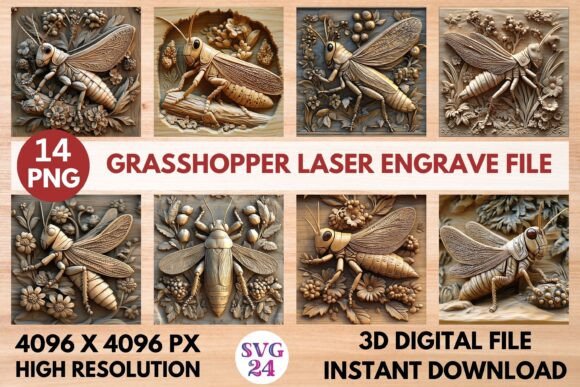
Unlock the potential of your laser engraving projects with the Grasshopper Laser Engrave File. This premium PNG design is meticulously crafted for laser engraving, offering a high-resolution, transparent background image that ensures sharp, intricate, and professional results. Whether you're a creator, designer, or hobbyist, this file is a must-have for elevating your creations.
High-Resolution Quality for Professional Results
The Grasshopper Laser Engrave File comes in a 4096x4096 resolution, providing the clarity and detail needed for precise laser engraving. This high-quality image is perfect for a variety of materials, including wood, stationery, textiles, tableware, and more. The transparent background allows for seamless integration into any project, making it ideal for both personal and commercial use.
Versatile Applications for Diverse Projects
With the Grasshopper Laser Engrave File, the creative possibilities are endless. Here are some ways you can use this versatile design:
- Home Decor: Engrave the design onto wooden plaques, coasters, or wall art to add a unique touch to your living space.
- Stationery: Personalize notebooks, journals, and planners with the intricate grasshopper design, making them stand out.
- Textiles: Embellish fabric for custom t-shirts, tote bags, or home linens, creating a one-of-a-kind look.
- Tableware: Add elegance to plates, mugs, and serving trays by engraving the design, perfect for special occasions or everyday use.
Compatibility and Ease of Use
This PNG file is optimized for a wide range of laser engraving devices, including Lightburn, xTool, Glowforge, Sculpfun, and CO2 laser cutting machines. Before purchasing, ensure that your machine and software are compatible to avoid any issues. You will receive a zip file containing 14 PNG images, each with a transparent background, ready for immediate use.
Practical Tips for Successful Engraving
To make the most of your Grasshopper Laser Engrave File, consider the following tips:
- Test on Scrap Material: Always test the design on a scrap piece of material to ensure the settings are correct and the engraving quality meets your expectations.
- Adjust Settings: Fine-tune the power, speed, and resolution settings on your laser engraver to achieve the desired effect. Different materials may require different settings.
- Resizing: The design is not editable, but you can resize it to fit your specific project. Ensure the proportions are maintained to keep the design's integrity.
- Material Selection: Choose the right material for your project. Wood, acrylic, and leather are popular choices for laser engraving, each offering a unique texture and finish.
Inspiring Creativity and Originality
The Grasshopper Laser Engrave File is not just a design; it's a tool for creativity. Whether you're a seasoned designer or a beginner, this file offers the flexibility to create stunning, personalized projects. From elegant home decor to custom gifts, the possibilities are limited only by your imagination.
By incorporating this design into your projects, you can add a touch of sophistication and uniqueness. Experiment with different materials and settings to find the perfect combination that suits your style and audience. The high-resolution and transparent background make it easy to integrate into any project, ensuring a professional and polished result.
Embrace the creative potential of the Grasshopper Laser Engrave File and start transforming your ideas into reality. With its versatility and high-quality design, you'll be able to create memorable and impactful projects that stand out.